Category: General FAQ

  • How to cancel your hosting plan

    We’re sorry to hear that you wish to leave us! But all good things must come to an end, so here’s how to say goodbye.

    If you’re having any issues with your plan, we can solve 99% of these (you would be surprised!) and would love the opportunity to help. Please get in touch and we’ll see what we can do.

    Cancel your plan

    1. Log in to the Zume client area.

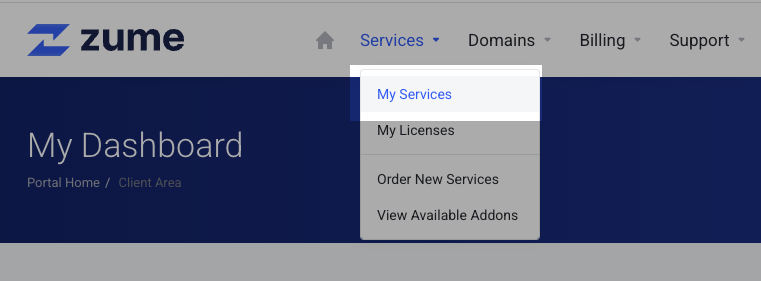
    2. Select “My Services” from the Services dropdown.
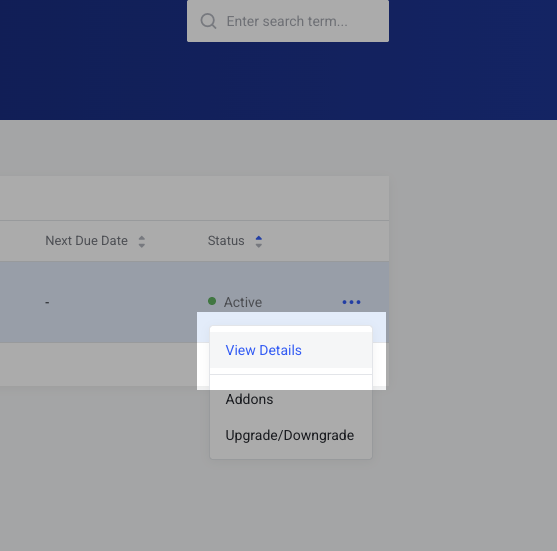
    3. Find the service you wish to cancel, and click the three dots then “View Details”.
    4. Select “Request Cancellation” from the left-hand menu.
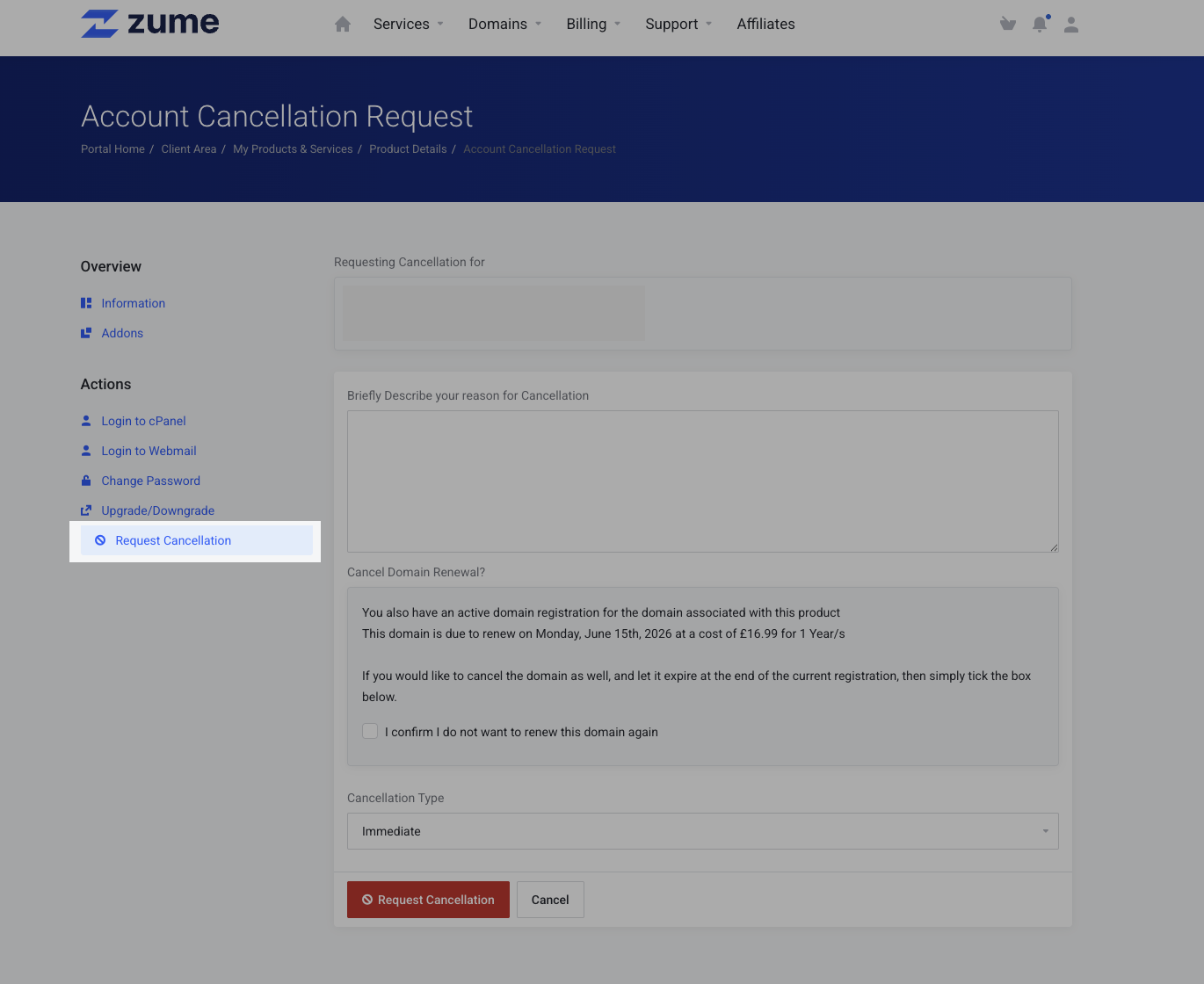
    5. We would appreciate it if you enter a reason for your cancellation. If you don’t want to provide one, just enter “N/A”.

    6. If you are within our 14-day money back guarantee, you must select “Immediate” as the cancellation type. Otherwise select “End of billing period” if you wish to continue using your service until the end of your pre-paid period.

    7. Finally, click the “Request Cancellation” button.

    Don’t forget!

    If you have a domain registration with Zume, you must also remember to disable “Auto-renew”. Otherwise the domain may renew automatically once due!

    Please get in touch if you would like any assistance confirming your cancellation.
  • Will you increase my renewal price?

    The price that is displayed on our website is the price you will pay. Unlike our competitors, you will not get to the checkout page only to find the “monthly price” is only valid when pre-paying for 3 years.

    While we take every measure to ensure your renewal price remains consistent, sometimes we may be forced to change our pricing model based on increasing supplier costs, currency fluctuations or other economic conditions such as inflation.

    We will only ever make changes to our pricing model when it is reasonable and justified to do so, and will always provide notice in advance.

  • Can I get a refund?

    We offer a 14-day money-back guarantee on all Website, Business, WordPress and Reseller hosting services.

    If you’re having an issue with your service, we would love to have the opportunity to put it right. Please open a support ticket if you have any questions or issues.

    Should you be unsatisfied with your hosting service, you can request a full refund within the first 14 days after purchase. To submit a refund request, please open a ticket here.

    Unfortunately, domain names, IP addresses, software licenses and management/hourly-billed services are exempt from our money-back guarantee. If you order a hosting plan with a free domain, the cost of the hosting plan minus the retail cost of the domain will be refunded.

    Refunds can take up to 14 days to process.

  • Which payment methods do you accept?

    We accept the following payment methods:

    For GBP payments

    • Card (Visa/Mastercard/Amex)
    • PayPal
    • UK Bank Transfer (Faster Payments)

    For EUR payments

    • Card (Visa/Mastercard/Amex)

    For USD payments

    • Card (Visa/Mastercard/Amex)
    • PayPal

    Please view your invoice for payment instructions.

  • When will my renewal invoice be generated?

    An invitation renewal is generated 14 calendar days ahead of  due date for all services.

    Overdue accounts will be suspended within 3 days of non-payment, and terminated within 14 days.

  • What happens if I don’t pay?

    Overdue accounts will be suspended within 3 days of non-payment, and terminated within 14 days.

  • Why is my order status “Awaiting Manual Review”

    Due to high levels of online fraudulent activity, as a precaution, we may review your order manually and/or require you to provide additional identification before your order is accepted and provisioned.

    If your order marked for manual review is not set up within 30 minutes, please open a ticket here.

    The identification is used only to verify your identity, and your ID will be deleted as soon as verification is complete.

    Should you be asked to provide additional identification, we accept the following types:

    • Passport
    • Driving License
    • Other government-issued identification

    You may cover information such as the ID photo, sex and date of birth. We must be able to see the full name, address, document ID number and expiry date.

    To prevent the use of stolen credit cards, we may also ask for a photograph of the card used for payment. You may cover up the card, except for:

    • Last 4 digits
    • Cardholder’s full name
    • Expiry date

    If you refuse to provide ID when requested, your order will be cancelled and refunded in full.

  • Does Zume have any discount or promo code coupons?

    We know you like to get a good deal – who doesn’t? But in an industry rife with misleading pricing and hidden fees, we believe in being upfront and transparent about our pricing.


    Does Zume offer one-time discounts for new customers or longer terms?

    No. We will always display the true monthly price on our website.

    Also known as balloon rates, it’s a common tactic for hosting companies to offer a discount for the first term of service, only to increase the price significantly in subsequent years.

    This practice is not only misleading, but also forces customers to lock themselves into long-term contracts.

    At Zume, we will always display the full monthly price on our website. While we do offer discounts for longer terms, this discount is permanent and will not expire after the first year.

    Does Zume ever have sales or promotions?

    At Zume we never run sales or promotions.

    We believe our current pricing is fair and transparent, and offers excellent value for the quality of the service we provide.

    We want to make sure that all our customers get the best possible deal, regardless of when they sign up.

    Do you have any discount or promo code coupons?

    We currently offer a discount to customers who choose to pre-pay for a period of time, as a thank-you for their loyalty.

    • 2 months free when pre-paying for 1 year
    • 6 months free when pre-paying for 2 years

    These discounts are applied automatically at checkout!

    If you would like to switch your monthly plan to a different cycle to avail of this discount, please get in touch!

  • What is included with Developer Tools?

    Some of our hosting plans include Developer Tools, which provide advanced features for developers.


    Which plans include Developer Tools?

    The following hosting plans include Developer Tools:

    • Website Hosting Ultimate plan
    • All Managed WordPress plans
    • All Business Hosting plans

    What is included with Developer Tools?

    Developer Tools include the following features:

    • Node.js Application Manager: Deploy and manage Node.js applications.
    • Python Application Manager: Deploy and manage Python applications.
    • Ruby Application Manager: Deploy and manage Ruby applications.
    • Git UI: Manage your Git repositories directly from your hosting account, with one-click deployments.
    • SSH Access: Securely access your hosting account via SSH for advanced server management.
  • What are Zume’s Nameservers?

    Zume operates a global anycast network with nameservers in multiple locations around the world. This ensures that your domain is always available and resolves quickly no matter where your visitors are located, as well as providing redundancy in case of a failure.


    Zume’s nameservers

    When you sign up for a hosting package with Zume, you will be provided with the following nameservers:

    ns1.zumedns.com
    ns2.zumedns.com
    

    We use an Anycast network with multiple redundant nameservers across the globe to bring you the best performance no matter where your visitors are.

    Good to know!

    Anycast is a networking approach that routes user requests to the nearest data center in our global network. This ensures faster response times and increased resilience against failures.

    To connect your domain to a hosting package, you must update your domain’s nameservers. The process will vary depending on where your domain is registered.

    Connect your domain registered with Zume

    If your registered your domain with us, your nameservers will already be automatically configured. You can manage your domain in the Client Area.

    You can update your domain’s nameservers by following these steps:

    1. Log in to the Client Area.
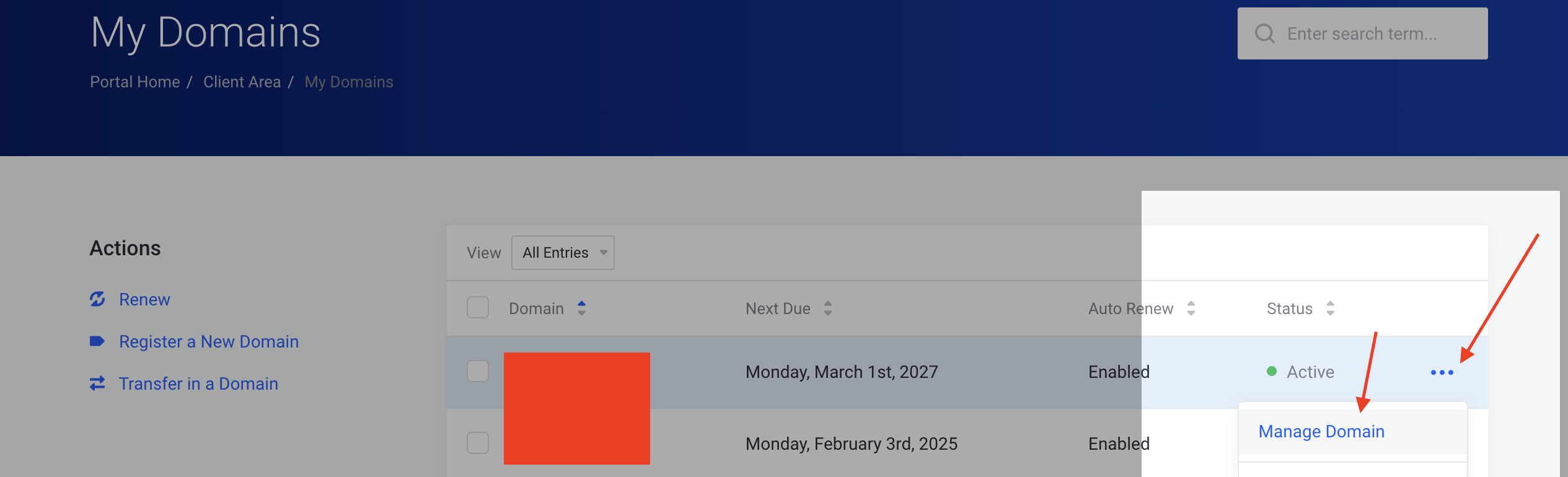
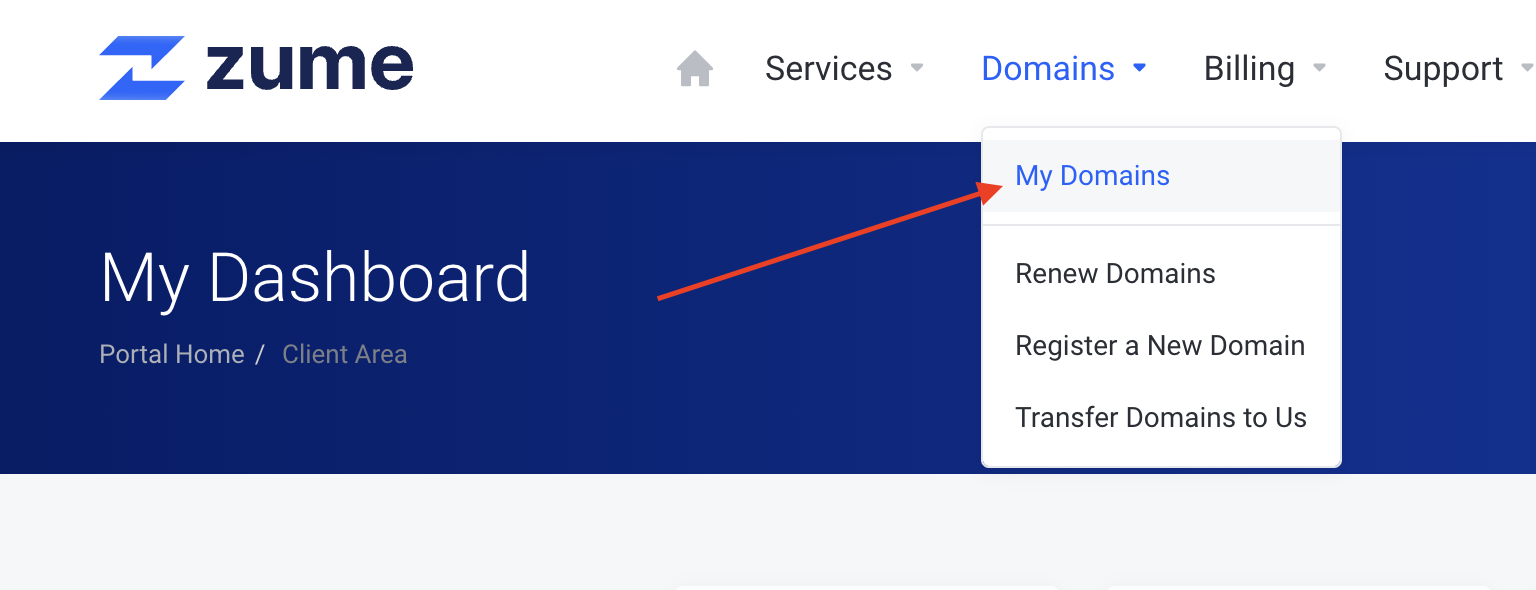
    2. Click on the Domains > My Domains menu option.
    Step 2
    1. Click on the domain you want to manage.
    Step 3
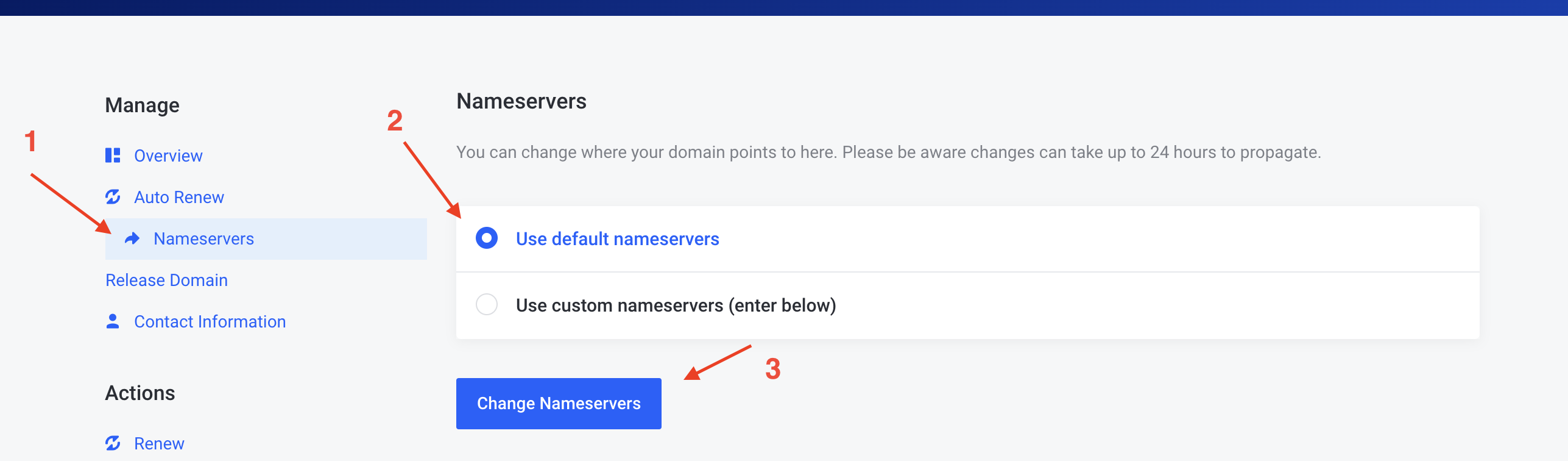
    1. Click on the Nameservers tab, select Use default nameservers and click Change nameservers.
    Step 4
    1. Allow up to 24 hours for the changes to propagate through the internet.

    Connect your domain registered with a third-party registrar

    If your domain is with a third-party registrar, you will have to update the domain’s nameservers using their control panel. Please consult their documentation or contact their support team for assistance.

    For your convenience, we have included some common registrar guides below: